
Run legal. Run on time.
ELD Run gives carriers and owner-operators electronic logs that keep drivers compliant, live GPS tracking for every truck, and the reports to run the day, all in one platform.
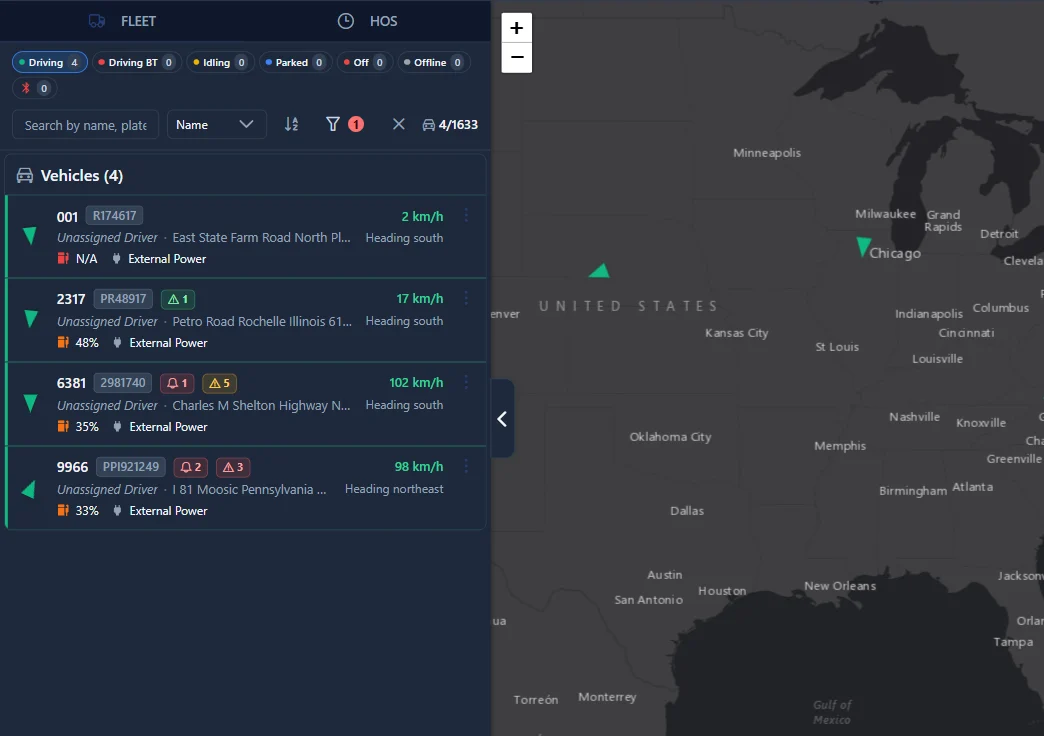
- Logs that follow 49 CFR Part 395
- Live GPS location for every truck
- Support from people who know trucking
- Driver app for iOS and Android
An ELD company built around the driver’s day
ELD Run provides electronic logging devices, GPS tracking and fleet management software to carriers and owner-operators across the United States.
Our aim is simple: logs that take care of themselves, so drivers can drive and dispatch can plan. The device records from the engine, the app shows the driver exactly how many hours are left, and the office sees the same picture in real time.
- Compliance
- Hours-of-service logs recorded from the engine, ready to hand over at roadside.
- Visibility
- Every truck, driver and remaining hour in one live view.
- Simplicity
- An app drivers learn in minutes and an office view with no clutter.
Our solutions
Five services, one platform and one login. Start with electronic logs and add the rest when you are ready.
- Electronic logging devices (ELD)
- Hours-of-service logs recorded automatically from the engine, driver vehicle inspection reports, and roadside data transfer, built to 49 CFR Part 395.
- GPS fleet tracking
- See every truck on a live map, with location updates, trip history, geofences and alerts when something moves that should not.
- Fleet management
- Maintenance schedules, fault codes, fuel expenses, documents and IFTA mileage reports in one place.
- Driver monitoring
- Speeding, harsh braking and idling alerts, plus unidentified driving records that are easy to assign.
- Reports
- Mileage, trips, device activity and geofence reports, delivered on a schedule to the people who need them.
Not sure which you need? Tell us about your fleet and we will recommend a setup.
Less time on logs, more time on the road
A violation costs money and a late load costs a customer. ELD Run keeps both in view, so nobody finds out too late.
Hours you can see coming
Drive, shift, break and cycle clocks count down for the driver and for dispatch, before a violation happens.
Roadside without the stress
The driver picks the transfer method and the logs go to the inspector in a few taps.
Every truck on one map
Live location, status and heading for the whole fleet, on desktop and on your phone.
One login for everything
Logs, tracking, maintenance and reports in the same place. No modules to stitch together.
Help when you call
Setup, training and support from people who understand hours of service.
Why electronic logging matters
Since December 2017, most interstate drivers who keep records of duty status must use an electronic logging device from the FMCSA registered list. The device records driving time from the engine, so the log shows what happened, not what was written down afterwards.

- What an ELD records
- Date, time, location, engine hours, miles and driver identity at every change of duty status, once an hour while driving, and at engine start and stop.
- At roadside
- An inspector can ask for the logs electronically. The device transfers them through web services or email, or locally by USB or Bluetooth.
- If something breaks
- The driver reports a malfunction within 24 hours and keeps paper logs. The carrier has 8 days to fix it.
- 11 to 19%average cost decreases reported by fleets using GPS tracking, across fuel, accidents, labor and maintenance Source: Verizon Connect, Fleet Technology Trends Report 2026 (vendor survey)
- Under 1 yeartime to return on investment reported by nearly half of the fleets surveyed Source: Verizon Connect, Fleet Technology Trends Report 2026 (vendor survey)
- 1,844crashes a year that FMCSA estimated the ELD rule would prevent Source: U.S. Government Accountability Office, GAO-16-401R (2016)
Common questions
Who needs an ELD?
Most interstate commercial drivers who are required to keep records of duty status. Exceptions include drivers who keep logs on 8 or fewer days in any 30-day period, driveaway-towaway operations, and vehicles with engines older than model year 2000. Short-haul drivers who qualify for the 395.1(e) exception are not required to keep logs at all.
What does the device record?
Date, time, location, engine hours, vehicle miles, and the driver and vehicle identity. It records these at every change of duty status, once an hour while driving, at engine power-up and shut-down, at login and logout, and whenever it detects a malfunction or a data problem.
What happens at a roadside inspection?
The inspector asks for the logs. Your driver selects the transfer method on the device and the records go to the inspector through web services or email, or locally over USB or Bluetooth. The driver should also carry the data-transfer and malfunction instruction sheets and at least 8 days of blank paper logs.
My current ELD was removed from the FMCSA list. What now?
FMCSA removed dozens of devices from its registered list in 2026. When a device is removed, carriers have 60 days to replace it before they are treated as having no ELD at all. Contact us and we will walk you through switching, including how to keep your existing logs.
Talk to us about your fleet
Call or email us with a few details about your fleet. We reply within one business day.
- Call773-560-9847
- Emailinfo@eldrun.example
- Office5665 W 120th Street
Alsip, IL 60803 - HoursMonday to Friday, 8am to 6pm Central
Already a customer? Call the same number and we will put you through to support.